[AI OpenAI-doc] 图像生成
> 想要在ChatGPT中生成图像吗?请访问chat.openai.com。
## 介绍
图像API提供了三种与图像交互的方法:
1. 根据文本提示从头开始创建图像(适用于DALL·E 3和DALL·E 2)
2. 通过让模型替换预先存在图像的某些区域,基于新的文本提示来创建编辑版本的图像(仅适用于DALL·E 2)
3. 创建现有图像的变体(仅适用于DALL·E 2)
本指南涵盖了使用这三个API端点的基础知识,并提供了有用的代码示例。想要尝试DALL·E 3,请前往ChatGPT。想要尝试DALL·E 2,请查看DALL·E预览应用。
## 用法
### 生成
图像生成端点允许您根据文本提示创建原始图像。在使用DALL·E 3时,图像可以是1024x1024、1024x1792或1792x1024像素大小。
默认情况下,图像以标准质量生成,但在使用DALL·E 3时,您可以设置quality:"hd"以获得增强的细节。方形、标准质量的图像生成速度最快。
您可以使用DALL·E 3一次请求1张图像(通过进行并行请求来请求更多),或者使用DALL·E 2并通过n参数一次请求最多10张图像。
```pythonfrom openai import OpenAIclient = OpenAI()response = client.images.generate(model="dall-e-3",prompt="a white siamese cat",size="1024x1024",quality="standard",n=1,)image_url = response.data[0].url```
## 提示
随着DALL·E 3的发布,出于安全考虑和为了增加更多细节(更详细的提示通常会产生更高质量的图像),模型现在会接受提供的默认提示,并自动重新编写它。
尽管目前无法禁用此功能,但您可以使用提示将输出更接近您请求的图像,方法是在提示中添加以下内容:`I NEED to test how the tool works with extremely simple prompts. DO NOT add any detail, just use it AS-IS:`。
更新后的提示在数据响应对象的 `revised_prompt` 字段中可见。
## 示例DALL·E 3生成
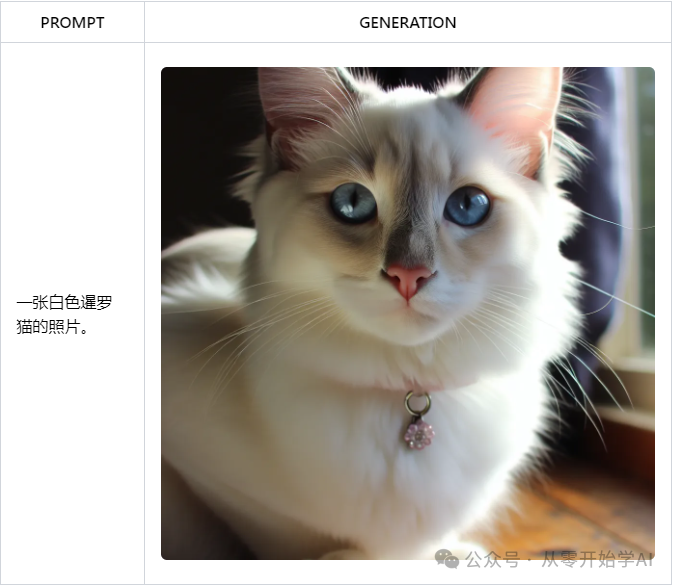
每个图像可以作为URL或Base64数据返回,使用response_format参数。URL将在一小时后过期。
### 编辑(仅适用于DALL·E 2)
也称为“修补”,图像编辑端点允许您通过上传图像和掩码来编辑或扩展图像,指示应该替换哪些区域。掩码的透明区域指示图像应该进行编辑的位置,提示应该描述完整的新图像,而不仅仅是被擦除的区域。该端点可以实现我们的DALL·E预览应用程序中的编辑器等体验。
```pythonfrom openai import OpenAIclient = OpenAI()response = client.images.edit((model="dall-e-2",image=open("sunlit_lounge.png", "rb"),mask=open("mask.png", "rb"),prompt="A sunlit indoor lounge area with a pool containing a flamingo",n=1,size="1024x1024")image_url = response.data[0].url```
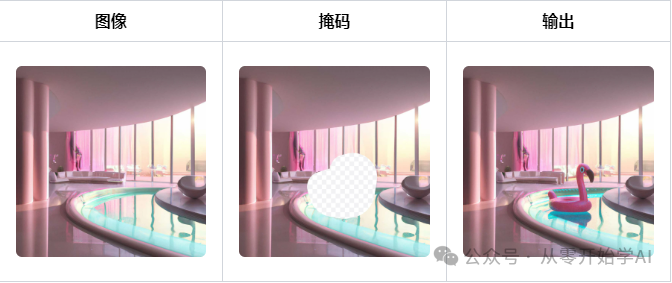
提示:一个阳光明媚的室内休息区,里面有一个含有火烈鸟的游泳池。
上传的图像和掩码都必须是小于4MB的正方形PNG图像,并且它们的尺寸必须彼此相同。掩码的非透明区域在生成输出时不会被使用,因此它们不一定需要像上面的示例一样与原始图像匹配。
### 变体(仅适用于DALL·E 2)
图像变体端点允许您生成给定图像的变体。
```pythonfrom openai import OpenAIclient = OpenAI()response = client.images.create_variation(model="dall-e-2",image=open("corgi_and_cat_paw.png", "rb"),n=1,size="1024x1024")image_url = response.data[0].url```
与编辑端点类似,输入图像必须是小于4MB的正方形PNG图像。
### 内容管理
基于我们的内容政策,对提示和图像进行过滤,当提示或图像被标记时返回错误。
## 特定语言的提示
### 使用内存中的图像数据
上面指南中的Python示例使用open函数从磁盘读取图像数据。在某些情况下,您可能将图像数据存储在内存中。下面是一个使用存储在BytesIO对象中的图像数据的示例API调用:
```pythonfrom io import BytesIOfrom openai import OpenAIclient = OpenAI()# This is the BytesIO object that contains your image databyte_stream: BytesIO = [your image data]byte_array = byte_stream.getvalue()response = client.images.create_variation(image=byte_array,n=1,model="dall-e-2",size="1024x1024")```
### 处理图像数据
在将图像传递给API之前进行操作可能很有用。以下是一个使用PIL调整图像大小的示例:
```pythonfrom io import BytesIOfrom PIL import Imagefrom openai import OpenAIclient = OpenAI()# Read the image file from disk and resize itimage = Image.open("image.png")width, height = 256, 256image = image.resize((width, height))# Convert the image to a BytesIO objectbyte_stream = BytesIO()image.save(byte_stream, format='PNG')byte_array = byte_stream.getvalue()response = client.images.create_variation(image=byte_array,n=1,model="dall-e-2",size="1024x1024")```
### 错误处理
由于无效输入、速率限制或其他问题,API请求可能会返回错误。可以使用try...except语句处理这些错误,并且错误详情可以在e.error中找到:
```pythonimport openaifrom openai import OpenAIclient = OpenAI()try:response = client.images.create_variation(image=open("image_edit_mask.png", "rb"),n=1,model="dall-e-2",size="1024x1024")print(response.data[0].url)except openai.OpenAIError as e:print(e.http_status)print(e.error)```
---
https://platform.openai.com/docs/guides/images/
https://openai-doc.aihub2022.top/docs/guides/images/
欢迎进群,一起交流学习AI